A RAG system never reads your documents. It reads chunks: the pieces you cut the documents into before indexing. Where those cuts fall decides what the retriever can match and what the model gets to read. A cut through the middle of an answer produces no error. The model gets half the evidence, then either says it doesn’t know or fills the gap with a guess.
We built a small app that shows this on ten kinds of documents. Pick a document type and it highlights every chunk on the real document: where we cut, what we keep together, and the context we attach. You can switch to a fixed-size split to compare. Three of the documents contain images: a report with charts, a slide deck, and a service manual with a parts diagram. They show how to keep a picture connected to the text that talks about it.
Try the app · Code and sample documents · It runs in your browser; no API key needed.
Three decisions define a chunking strategy
- Where to cut. Every N characters, at the nearest paragraph or sentence, or where the document’s format says a unit ends (a heading, a function, a clause, a table row).
- What to keep together. A heading with its text, a question with its answer, an image with its caption.
- What to attach. A chunk taken out of its document loses its title, its section heading and, for a table row, the header that names the columns. Good chunking puts that context back.
Fixed-size chunks cut anywhere
Cutting every 400 tokens is the simplest strategy, and it is blind to structure. Across our ten sample documents, 54 of the 67 fixed-size cuts land in the middle of a sentence, a line or a table row. In the Python file, 5 of 7 cuts do, including one that splits a comment in two:
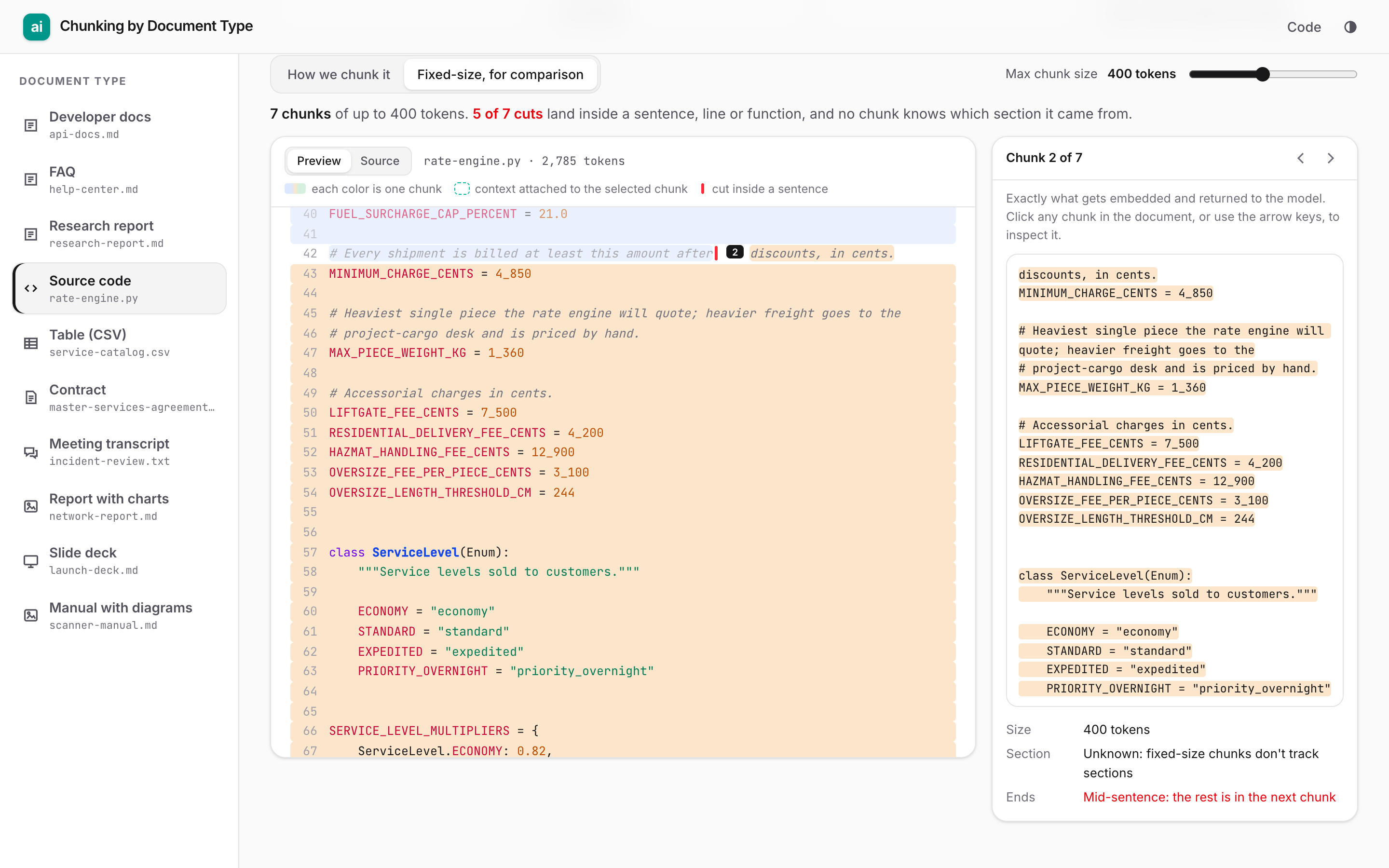
The second chunk starts with “discounts, in cents.” and then holds the fee constants, an enum and a dict: three unrelated things. A single embedding of that chunk matches none of them well.
Cut where the document says a unit ends
Authors already divide their documents into units that each say one thing. A structure-aware splitter cuts there:
| Document | Cut at | Keep together | Attach to every chunk |
|---|---|---|---|
| Developer docs | Every heading | A heading with its text | Title and heading path |
| FAQ | Every question | The question and its whole answer | Category heading |
| Research report | Sections, then paragraphs | Whole paragraphs | Title and section heading |
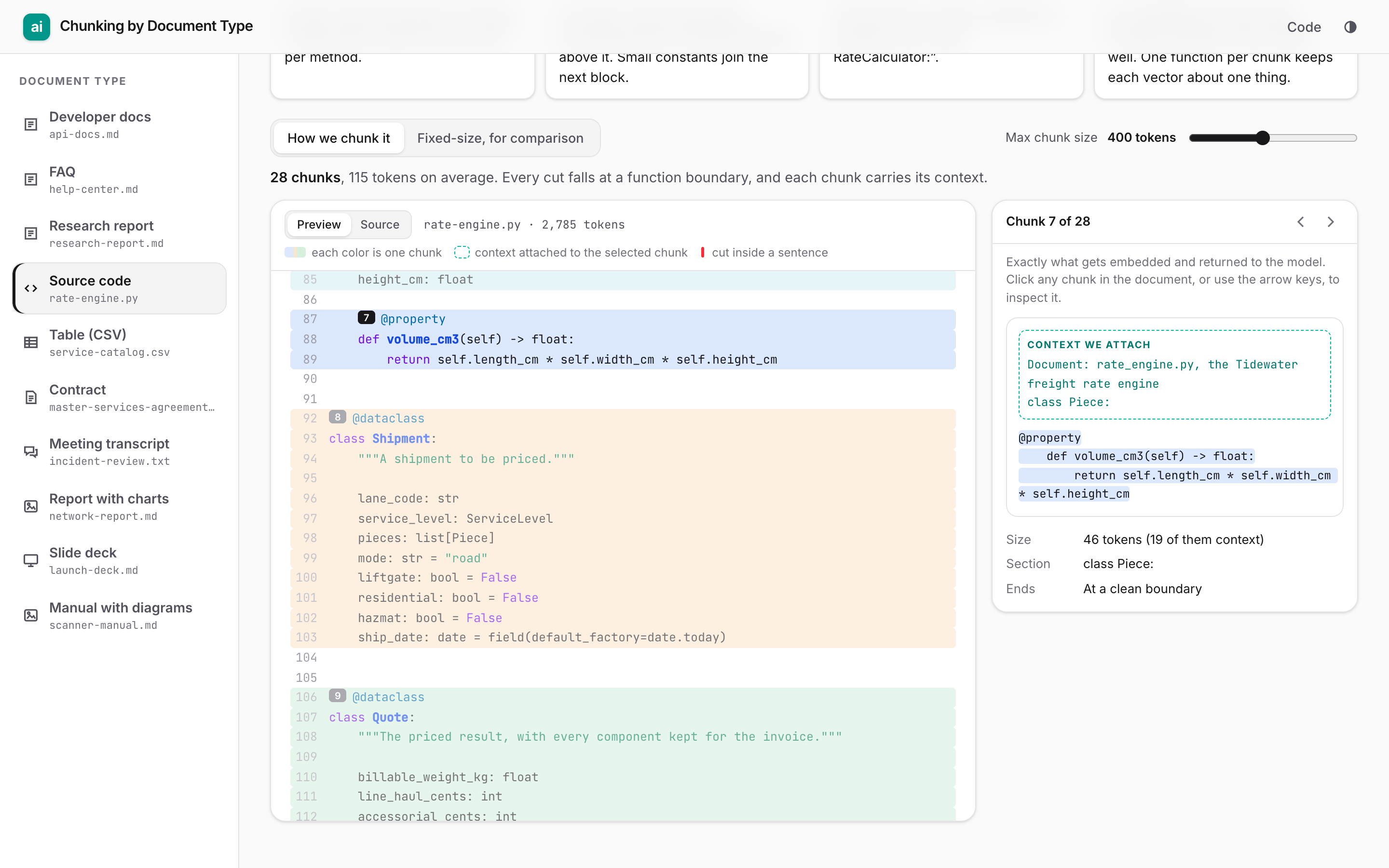
| Source code | Each function and class; large classes per method | A function with its decorators, docstring and comments | File name, class line |
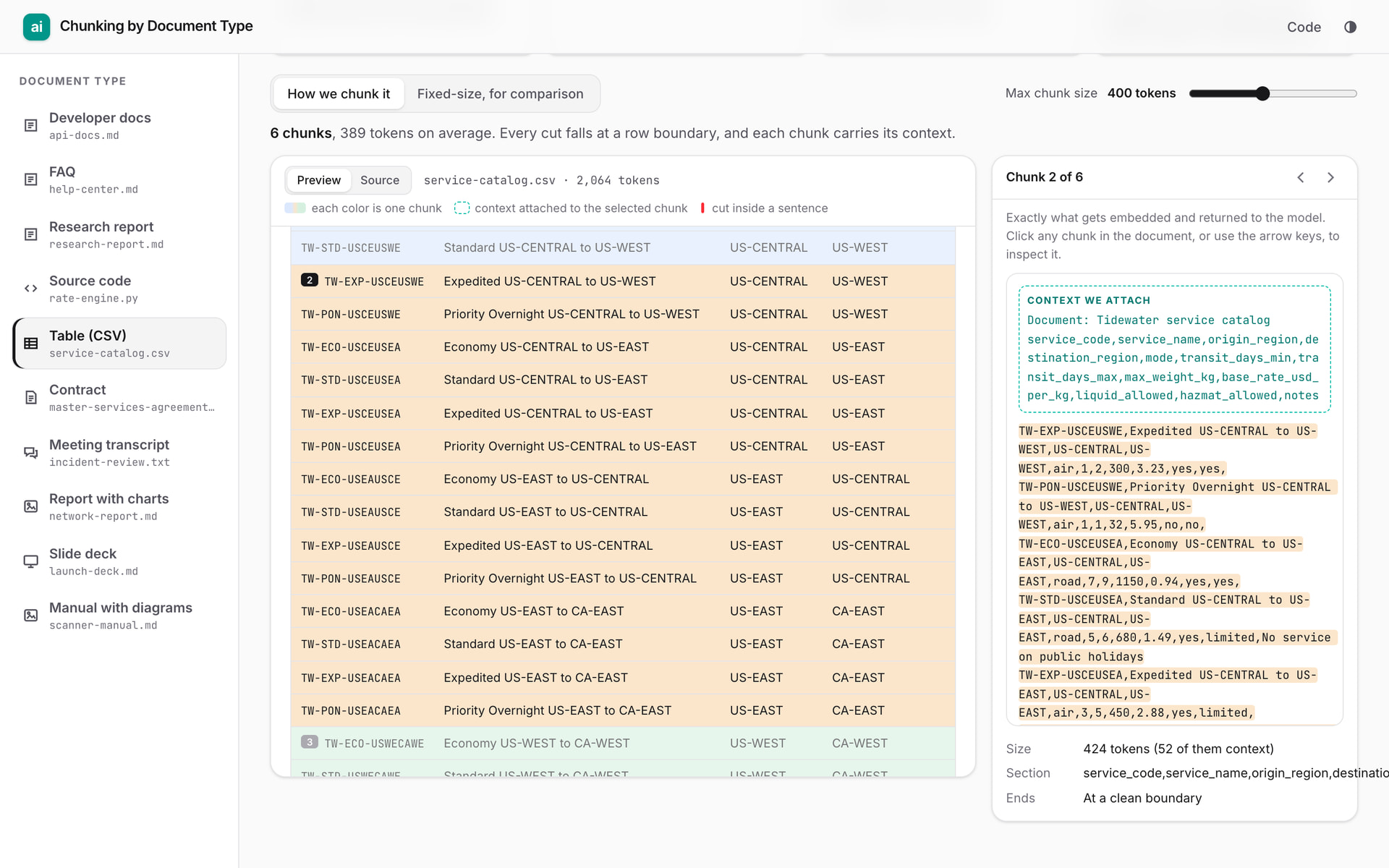
| Table (CSV) | Between rows | Every row | Title and the header row |
| Contract | Each numbered clause | The whole clause | Title and article heading |
| Meeting transcript | Between speaker turns, packed | Every turn | Meeting title |
| Report with charts | Headings; each figure on its own | An image and its caption | Section path, image description, citing sentences |
| Slide deck | Every slide | Title, bullets, image and speaker notes | Deck title, image description |
| Manual with diagrams | Headings; each figure on its own | An image and its caption; a procedure’s steps | Links from steps to the diagram and parts table |
A unit longer than the size limit is split recursively: at blank lines, then line breaks, then sentence ends. Short neighbours that mean little alone, such as table rows and transcript turns, are packed together. The same Python file becomes 28 chunks, one per function or method:
Attach the context
This row from the service catalog is a chunk on its own:
TW-STD-USEAEUWE,Standard US-EAST to EU-WEST,US-EAST,EU-WEST,sea,22,26,1360,3.14,no,yes
Is 22 the transit time, the weight or the price? Only the header row says it’s transit_days_min. So every table chunk carries the table title and its header row. Markdown chunks carry their heading path (“Webhooks › Retries and delivery”), contract clauses carry their article (“9. LIMITATION OF LIABILITY”), and methods carry their class line. It costs a few tokens per chunk and needs no model calls. It is a cheap, deterministic version of what Anthropic calls contextual retrieval.
The hard case: images
PDF and slide parsers turn each picture into an image file plus its caption. A text-only pipeline then indexes the file name and nothing else. Our three image documents each show a different way this goes wrong.
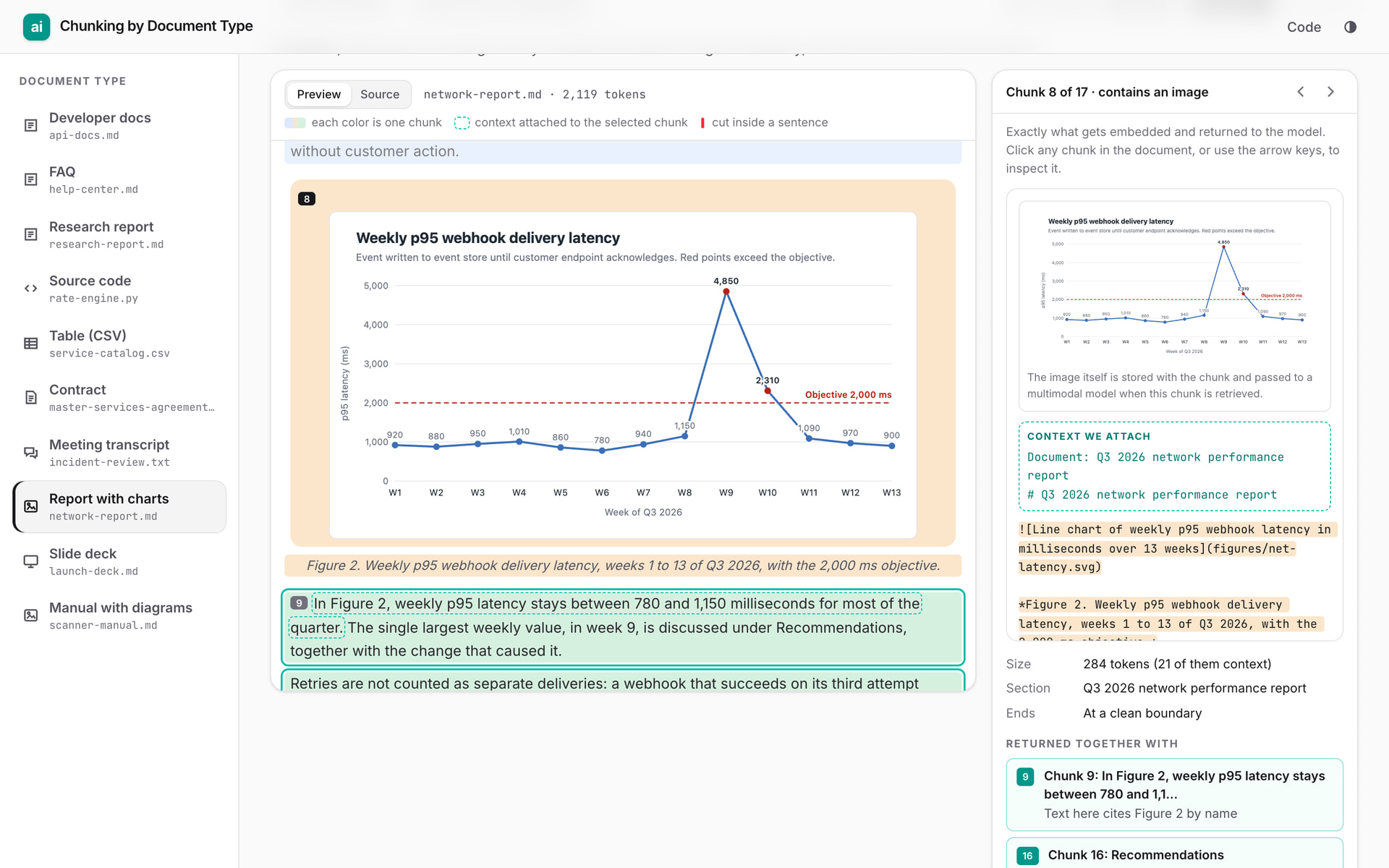
The meaning is only in the image. The report says only “Figure 4 breaks late deliveries down by cause.” The fact that customs clearance causes 41% of late deliveries is in the chart, not the text. No text search can find it unless something describes the chart.
The reference is far away. Figure 2 sits in the “Webhook latency” section. The sentence that explains it, “As Figure 2 shows, p95 webhook latency rose to 4,850 milliseconds in week 9…”, is three sections later, in Recommendations. Retrieve that sentence alone and the model reads about a chart it never sees.
The text is meaningless without the picture. The service manual’s steps say “Remove the four screws (4) and lift the battery door (3).” The numbers are callouts on an exploded-view diagram.
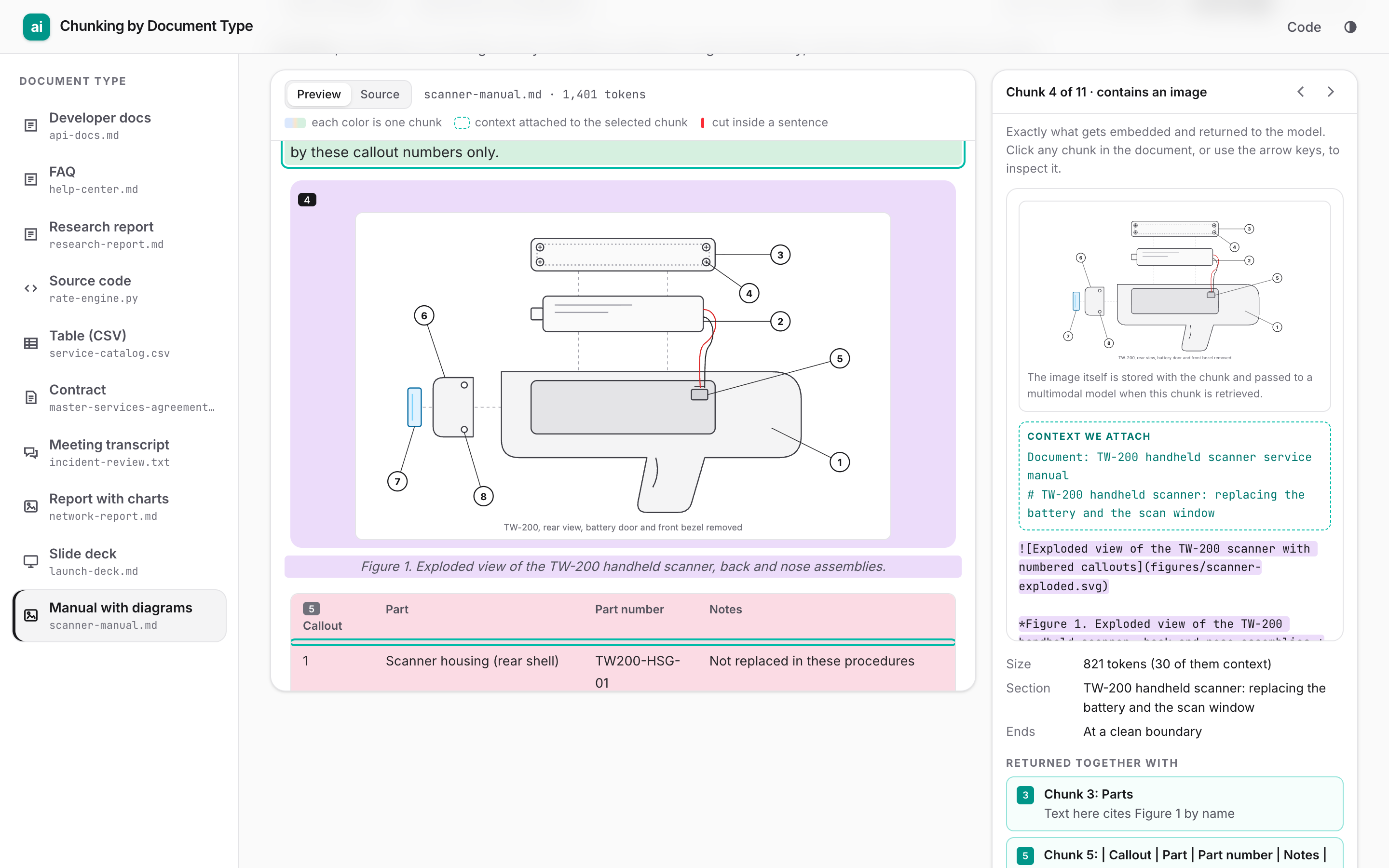
Here is what we do:
- Each figure (image + caption) is its own chunk. The caption never ends up in a different chunk from its image.
- The figure chunk embeds a description of the image, the kind a vision-language model writes: chart type, axes, every labelled value, every callout. This makes “41% customs” findable by text.
- We find every sentence that refers to the figure: “Figure 2” or “Fig. 2” by name; “the chart below” or “the diagram above” by position; “the previous slide” in decks; “(4)”-style callout numbers in manuals. Those sentences are attached to the figure chunk.
- The figure and the chunks that cite it are linked both ways. Retrieving either one returns the other, and the original image travels with the chunk, so a multimodal model can read the actual chart when it answers.
Slides are simpler: the slide is the unit. Slide text is terse, and the meaning lives in the image and the speaker notes, so title, bullets, image description and notes stay in one chunk.
How production systems handle images
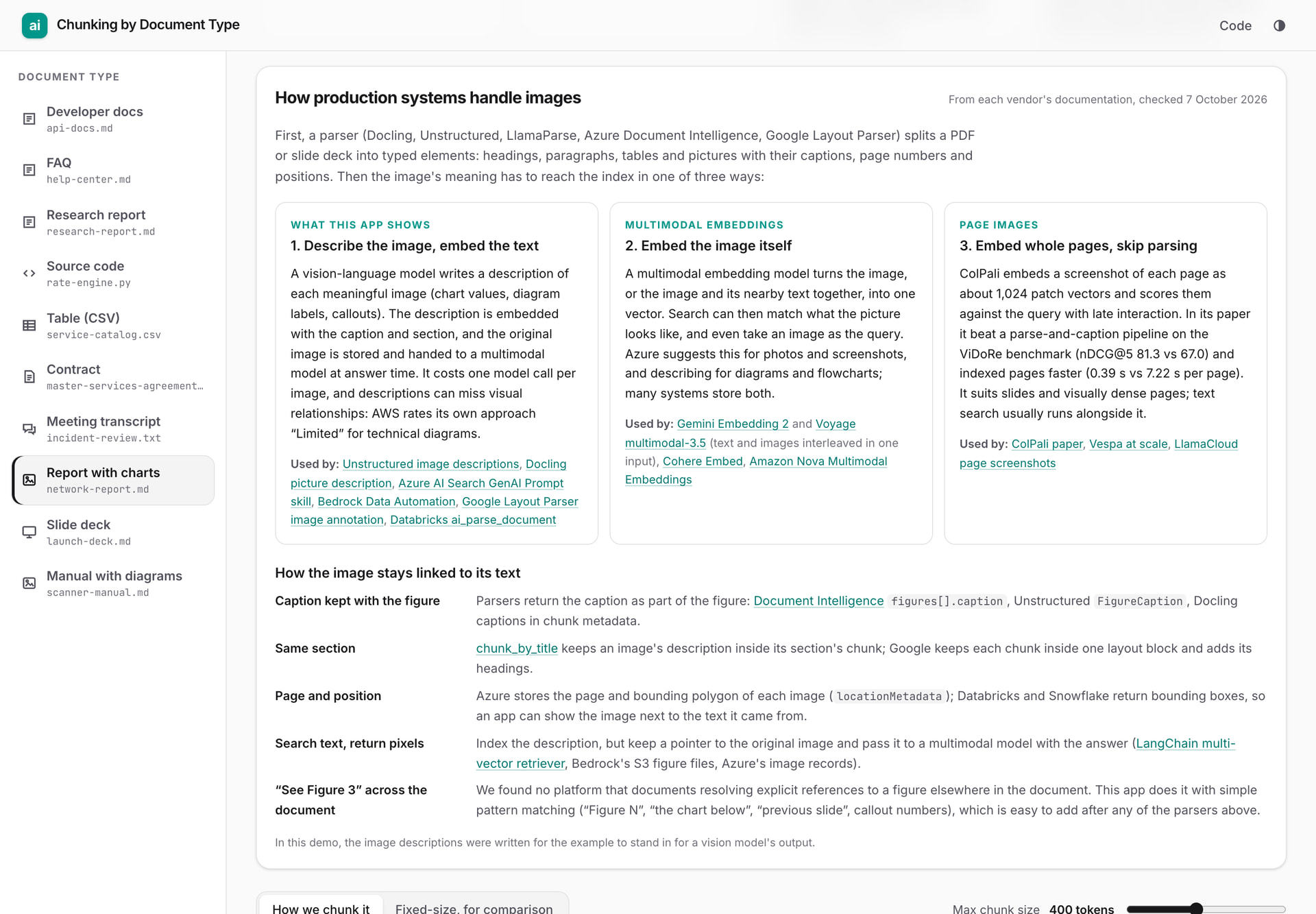
We read the current documentation (checked 7 October 2026). First, a parser splits a PDF or deck into typed elements: headings, paragraphs, tables and pictures, with captions, page numbers and bounding boxes. Examples are Docling, Unstructured, LlamaParse, Azure Document Intelligence and Google’s Layout Parser. Then the image’s meaning reaches the index in one of three ways:
| Approach | How it works | Who documents it | Trade-off |
|---|---|---|---|
| Describe the image, embed the text | A vision model writes a description; it’s embedded with the caption and section | Unstructured, Docling, Azure AI Search, Bedrock Data Automation, Google Layout Parser, Databricks | One model call per image. AWS rates its own version “Limited” for technical diagrams: it “extracts text labels but misses visual relationships”. |
| Embed the image itself | A multimodal embedding model turns the image, or image and text together, into one vector | Gemini Embedding 2, Voyage multimodal-3.5, Cohere Embed, Amazon Nova | Matches what the picture looks like and accepts image queries. Azure suggests it for photos and screenshots, and descriptions for diagrams. |
| Embed whole pages | ColPali embeds a page screenshot as about 1,024 patch vectors and scores them with late interaction | ColPali paper, Vespa, LlamaCloud page screenshots | On ViDoRe it scored nDCG@5 81.3 vs 67.0 for a parse-and-caption pipeline, and indexed at 0.39 s vs 7.22 s per page (the paper’s numbers). Suits slides and dense pages. |
The image stays linked to its text by:
- caption: parsers return the caption as part of the figure;
- section: Unstructured’s
chunk_by_titlekeeps an image’s description in its section’s chunk; - page and bounding box: Azure’s
locationMetadata, Databricks’bbox; - “search the text, return the pixels”: index the description, but keep a pointer to the original image and pass it to the model.
One thing we didn’t find: no platform we checked documents resolving “see Figure 3” to a figure elsewhere in the document. That’s the step our app adds, with plain pattern matching after parsing.
Practical advice
- Start with structure, not size. If you know the format, cut at its units. Fall back to recursive splitting (paragraphs, then lines, then sentences) at about 200–400 tokens for unknown text.
- Attach the section path to every chunk. It’s the cheapest improvement available and needs no model calls.
- Never split a caption from its image, or a row from its header.
- Describe meaningful images (charts, diagrams) with a vision model. Skip decorative ones: Docling’s picture description, for example, skips pictures smaller than 5% of the page area by default.
- Link figures to the text that cites them, and return the original image with the chunk.
- Treat slides and dense pages as whole units, and consider page-image retrieval for them.
Limitations
- The ten documents are synthetic, written for this example about one fictional company.
- The parsers use line patterns. Production code should use a real parser (a Markdown AST, tree-sitter for code, Docling or similar for PDFs).
- The app shows how documents are chunked. It does not measure retrieval quality, so test any strategy on your own questions.